
Advantrix Consulting
Products  /  TaskWalk  /  Audit Automation

Every purchase order audited, not a sample of them.

Audit Automation for SAP S/4HANA and SAP Ariba is pre-audit and continuous control monitoring for procurement. It runs over 270 rule-based sub-checks on each purchase order, across 36 control areas, and gives the reason each one passed or failed.
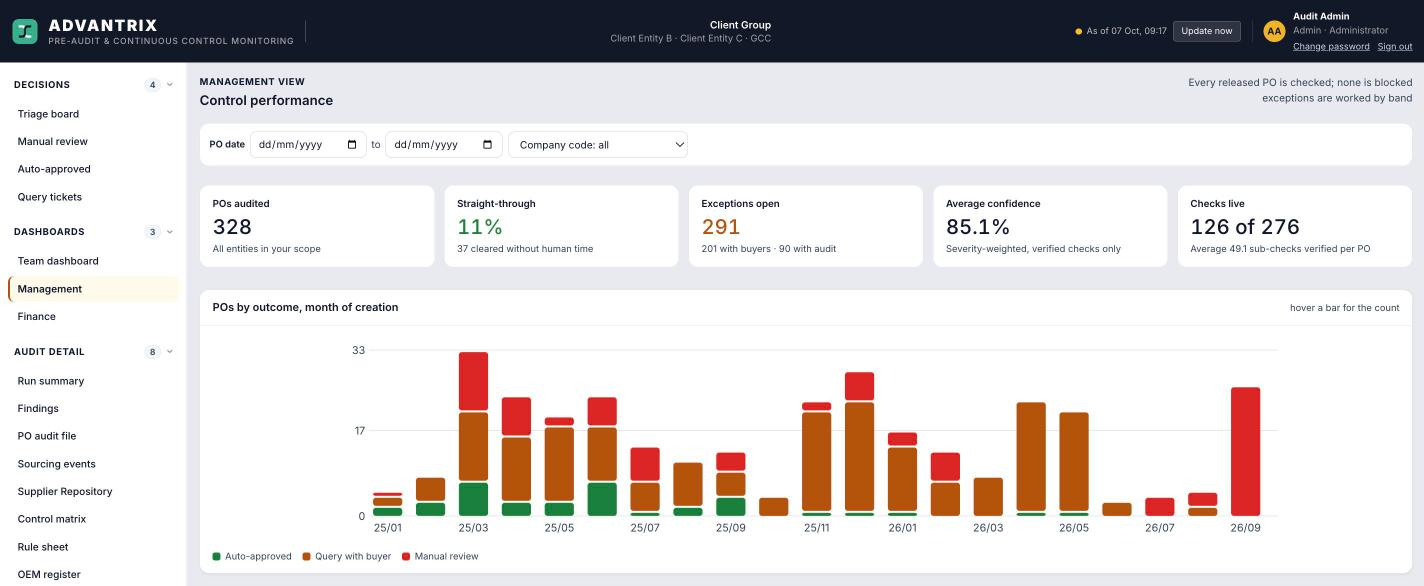
The management dashboard, with tiles for purchase orders audited, the straight-through rate, open exceptions, average confidence and checks live, above a monthly chart of purchase orders by outcome: auto-approved, query with buyer and manual review
How it runs

From the purchase order to a logged audit decision.

  1. 01
    Read

    Purchase orders from SAP S/4HANA and sourcing events, approvals and supplier records from SAP Ariba, refreshed up to three times a day.

  2. 02
    Check

    Each purchase order is put through the sub-checks. Every result carries the evidence behind it.

  3. 03
    Score

    The purchase order gets a confidence score and goes into one of three lanes.

  4. 04
    Decide

    The auditor records a decision and the reason for it. Both are logged.

Confidence triage board

Three lanes, so audit time goes where it is needed.

A single critical finding sends a purchase order to manual review whatever its score. The board filters by company code, purchasing organisation, plant, buyer, failed check or currency.

Auto-approvedCleared without human time.
Query with the buyerSent back to the buyer for an answer.
Manual reviewHeld for the auditor to decide.
PO audit file

One page per purchase order, with the evidence behind every result.

Every sub-check is shown as pass, fail, observation, cannot verify or not applicable, with what was found: the approval chain, delegation of financial power limits, Incoterms, freight and award price.
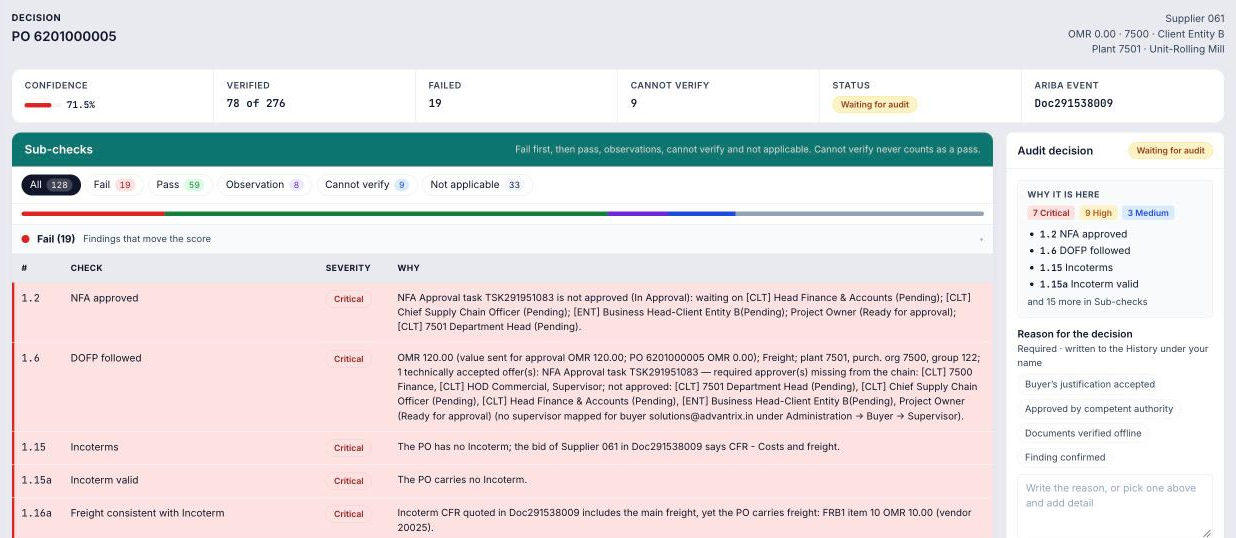
The audit file for one purchase order: confidence score, counts of verified, failed and cannot-verify checks, a list of failed sub-checks with severity and the reason for each, and a panel where the auditor records a decision and a reason
Findings work queue

Every failed check, across all purchase orders, in one list.

Each finding shows its severity, buyer, age and the reason in plain language. The list can be filtered and exported to CSV for follow-up.
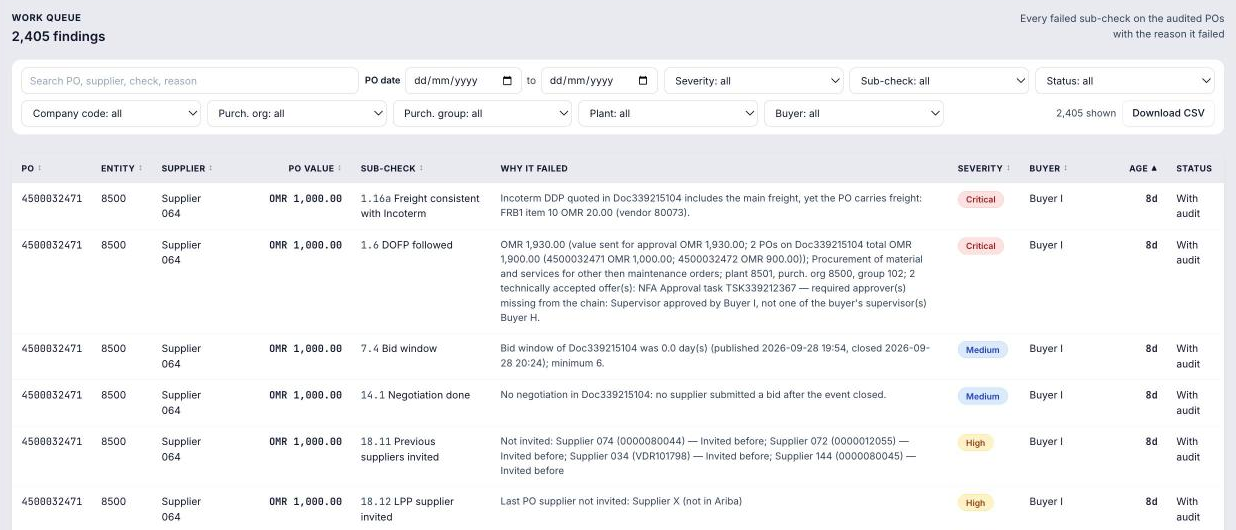
The findings work queue: a filterable table of failed sub-checks with purchase order, entity, supplier, value, the sub-check, why it failed, severity, buyer, age and status, and a Download CSV button
Supplier repository

Expired documents and mismatched bank details, flagged before a purchase order is placed.

Supplier master data from SAP Ariba Supplier Management in one place: registration status, CR and VAT expiry, bank account holder against supplier name, and certificates and questionnaires.
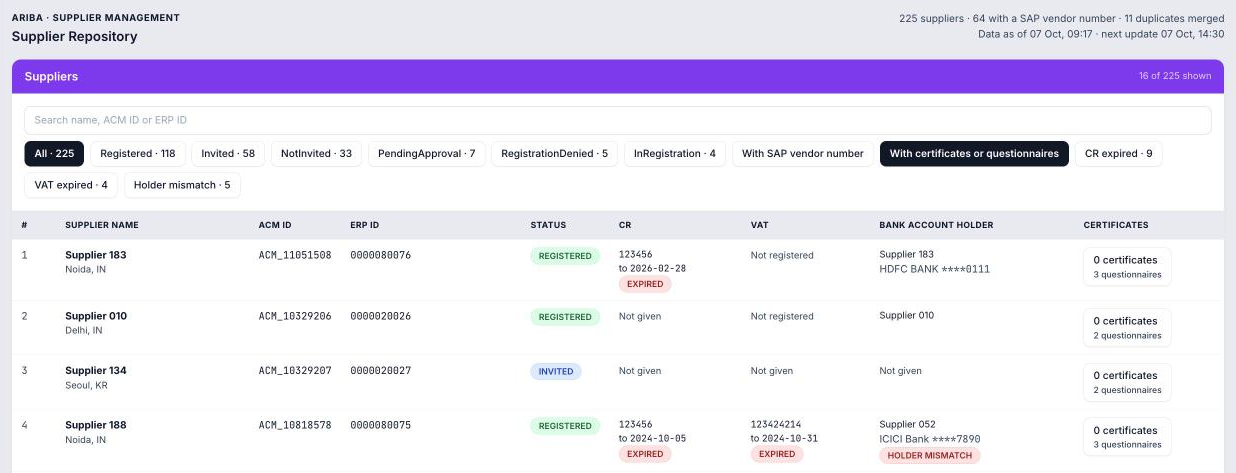
The supplier repository: a table of suppliers with registration status, CR and VAT validity with expired flags, bank account holder with a holder mismatch flag, and counts of certificates and questionnaires
What it checks

Seven groups of controls, from sourcing to price history.

Sourcing compliance
NFA approval, bid window, negotiation held, L1 award on landed cost, and single-source and OEM justification.
Approval controls
Delegation of financial power limits, release strategy and supervisor approval.
PO against award
Price, quantity, Incoterm, payment terms and freight compared with the SAP Ariba award.
Post-release changes
Release and de-release log, field changes after release, and a re-test against L1 when the currency changes.
Regularisation
Goods receipt reversed and re-posted, and currency changed after receipt.
Supplier due diligence
CR and VAT validity, bank holder match, and supplier country against PO currency.
Price history
Current price against last purchase price, with justification.
How it works

Nothing is blocked in SAP. Findings are worked inside the tool.

Connects to
SAP S/4HANA through OData, and the SAP Ariba APIs for Sourcing, Approvals and Supplier Management.
Refresh
Scheduled up to three times a day, with incremental loads.
Configuration
Thresholds, tolerances and severities are set in Admin, with no code changes.
Security
Role-based access for buyer, section head, procurement head, auditor, finance and management.
Audit trail
Every decision is logged.
Deployment
In the customer's own cloud tenant.
Part of TaskWalk

Related modules.

AuditIQ Forensic audit across the suite. Ariba Automation An assistant for routine sourcing steps in SAP Ariba. PaySmart AP Procure to pay, from invoice to payment. SupplierIQ Vendor onboarding and compliance.
See it running

Ask for a demo and we will open the audit file of one purchase order and go through each finding with you.

Request a demo